IO.Bot is a multi-platform software developed by T-Motion allowing to manage robotic cameras and PTZs.
Learn more about → https://evs.com/solutions/t-motion
Set up IO.Bot connection
-
Configure the IO.Bot server IP address in Director > Setup > Machine and wait for the “Connection successful” notification
IO.Bot must run its REST API server in the same network as Pixotope. Please contact T-Motion for details.
Create presets and trajectories
For information on how to create presets for robotic cameras or PTZs, please refer to T-Motion’s documentation.
Supported preset types
|
Type |
Supported calls |
|---|---|
|
Position |
|
|
Trajectory |
|
Trigger presets from Control panel
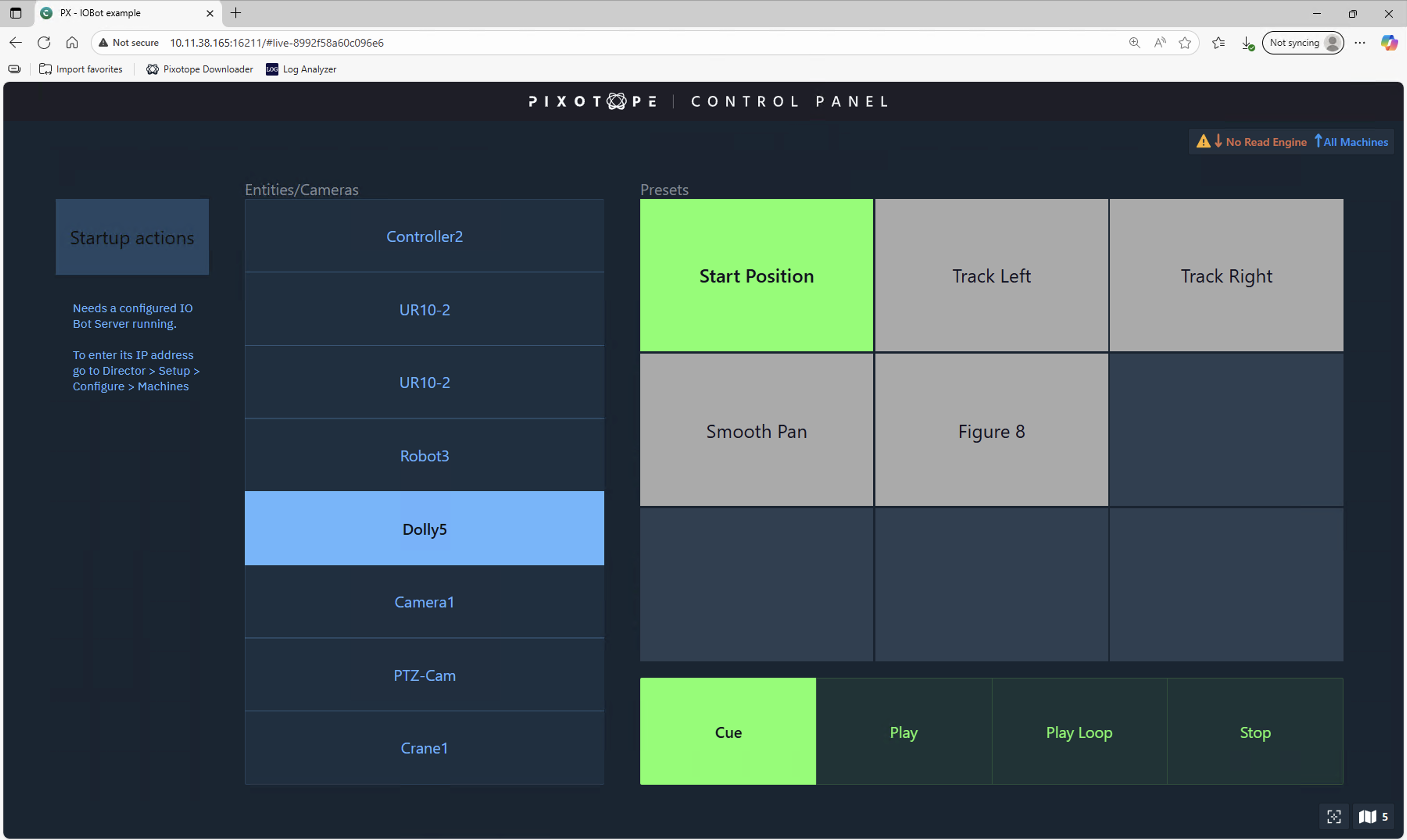
The current setup involves API call triggers. An example setup can be checked out in the attached control panel.
Launch IOBot test panel
-
Go to the Launch panel in Director
-
Click the "Open control panel" button
-
Select the PX - IOBot example and click "Launch LIVE"
IOBot example panel documentation
-
In Director > Configure > Machines enter IP and Port of the IO.Bot server
-
Click "Test connection"
-
-
Select a camera from the Entities/Cameras list
-
Select a preset from the Presets list
-
Click Cue, Play, Loop, Stop