If you are completely new to color management, here are some of its general concepts.
General concepts
Color management, and the concept of "linear light" and HDR, are no easy topics. It is easy to get lost in terminology, theory and different implementations. In this section we’ll try to demystify some of the key concepts that go into working with color, and explain in simple terms why they are important.
Light in the real world and how humans perceive it
In real life, light combines in a straight line - that's the "linear" in "linear light" / "scene referred linear".
Imagine you have a spotlight shining on a wall, then imagine adding another spotlight, with the same brightness, shining at the exact same spot. If you measured the brightness on the wall with a light meter, it will have doubled, in other words it will be twice as bright.
However, to our eyes (and our cameras) it will not look twice as bright (even if it is). This is because we see light and colors in a non-linear way, where our eyes "compress" highlights and "lift" shadows (the "gamma of our eyes).
How cameras see
By a combination of happy coincidence and clever design, the way cameras (both film and video) capture light, very closely resembles the way our vision does it, so images that "look right" to our eyes on modern displays have a gamma that aligns with the way our brains transform light into pictures.
Uniting all cameras and screens with color management
While the screens and cameras we use already function in a way that's well suitable for eyes, they are not all the same.
If you want the colors to look the same, on a screen as in the real world, regardless of which camera we use to capture the color or which display we use to view the colors, we need a way to translate the color information between all the cameras and displays. This is what Color Management is for.
What is a color space?
A color space specifies three things:
Primaries (gamut) — the three colors (red, green, blue) that are mixed to produce all other colors the space can represent. The primaries define the boundary of which colors can be shown, drawn as a triangle on a chromaticity diagram
Transfer function ("tone curve") — how the brightness values are encoded, from the darkest to the brightest value the system can represent. Examples are gamma 2.2/2.4 curves, log curves, PQ and HLG
White point — which coordinate in the space is defined as "white" (most commonly D65)
Together these define both the available colors (gamut) and the available brightness range (dynamic range). A color space does not change the colors in a scene — it defines the limits of which colors can be represented, and how they are encoded.
Color space vs color model
These terms are often confused:
A color model (RGB, HSL, HSV, CMYK, YCbCr) is just a coordinate system — a way of describing the same data from a different perspective. The values are relative and do not mean anything on their own: an RGB triplet does not describe an actual, physical color until it is anchored to a color space
A color space (Rec.709, Rec.2020, sRGB, DCI-P3) actually encodes the values, with defined primaries, transfer function and white point
An absolute reference space (CIE XYZ, CIELAB) is a theoretical space that contains all visible colors. No device can display it, but every other color space can be described as a subset of it — which is what makes precise conversion between color spaces possible
Display referred vs scene referred
There are, simplifying a little, two different reasons to do color management, and two camps named after them:
Display referred — pixel values are defined relative to the target display. The only concern is what the image looks like on the screen where it is finally watched. Traditional broadcast is entirely display referred: the camera is set to Rec.709 and captures the image the way it will be displayed, the vision mixer does not convert or process anything, and the output is the same space as the camera. Nothing needs converting because everything lives in the same display space.
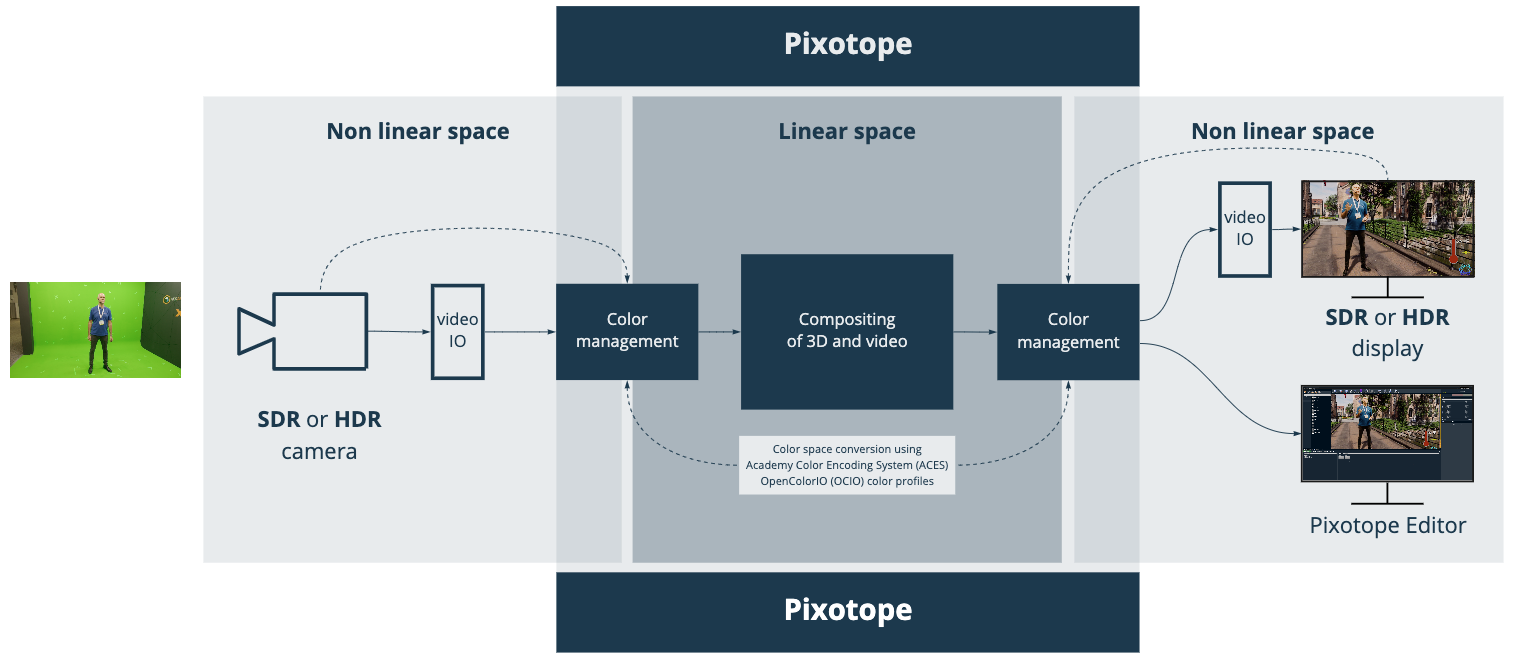
Scene referred — pixel values are defined relative to the real-world light in the scene. The goal is to reconstruct the light that was captured by the camera, so the image represents the actual relative light values of the objects in the scene — a virtual representation of reality. This is what makes it possible to combine 3D graphics with video scientifically: if the graphics are produced the same way light behaves in the real world, they simply fit, without artistic guesswork.
A simple way to remember it: scene referred is about matching (cameras to cameras, graphics to video), display referred is about what it looks like on the output.
Pixotope's main job is to be scene referred. Pixotope converts video and graphics into the same linear, scene referred space (ACEScg), combines them there, and gives back the video unchanged with the graphics matched to it. It is not Pixotope's job to decide the final look of the video — that happens downstream. This is also why virtual production needs a fundamentally different approach to color than traditional broadcast graphics: graphics workflows are display referred ("what you see is what you get"), while virtual production has to recreate real light to get natural, consistent results.
Linear is not the same as scene referred. "Linear" only describes how brightness is encoded (double the value = double the light); "scene referred" describes what the values represent (real-world light captured by the camera). A color space named Linear sRGB or Linear Rec.709 simply means a linear transfer curve with that gamut — it says nothing about the data being scene referred. Display referred data can also be linearized, but the scene information is already baked out and gone.
What Is HDR?
Super-Detailed Images: HDR lets your TV or computer show you images with more details in the bright parts (like the sun shining in the sky) and the dark parts (like the shadows under a tree). This is referred to as the dynamic range.
More Colors: It's like upgrading from a regular box of crayons to a super deluxe set with every shade of every color. This means the greens of trees and the blues of the ocean look more real and vibrant. This is referred to as the color gamut.
How Does HDR Work?
When you capture a video with HDR, the camera captures the scene in a special way that keeps all the details in the brightest and darkest areas, just like your eyes would see it.
When you watch an HDR video on a TV/Monitor that is capable of doing HDR, the TV or device knows how to use those extra details to make the picture look as close to real life as possible.
Why It Matters
By using linear space, HDR and color management, we make images and videos that look more realistic, consistent and pleasing.