
The Project Settings view can be found under the "Edit" menu and can be set per project. The Pixotope settings are grouped into the sections below, matching the categories shown in the Editor.
API
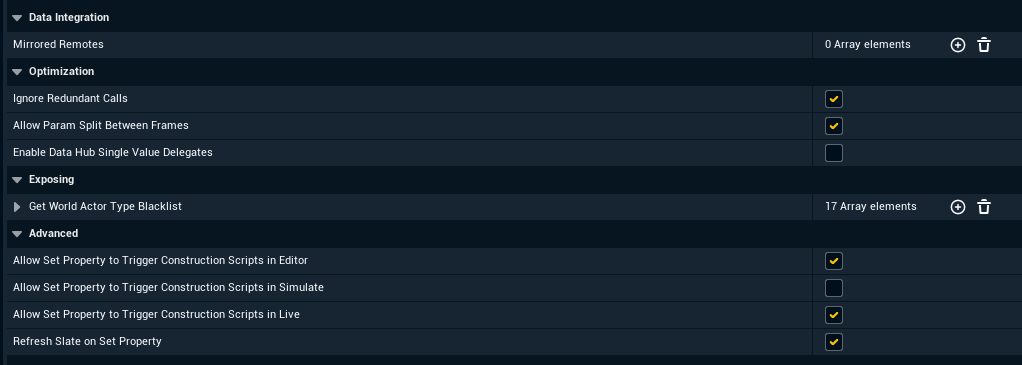
Data Integration
|
Name |
Description |
|---|---|
|
Mirrored Remotes |
Data Hub values from other services to mirror into this engine, alternative to using a Mirror blueprint node on Begin Play, each entry giving the source service and the value name. |
Optimization
|
Name |
Description |
|---|---|
|
Ignore Redundant Calls |
Skips API calls that would set a property to the value it already has. |
|
Allow Param Split Between Frames |
Lets a call that asks for it spread one of its list parameters over several frames, handling one entry per frame. |
|
Enable Data Hub Single Value Delegates |
Generates the OnDataHubUpdateReceived_SingleValue and OnDataHubUpdateReceived_Struct Blueprint updates. |
Exposing
|
Name |
Description |
|---|---|
|
Get World Actor Type Blacklist |
Defines which actor types should be ignored when responding to GetWorld API call. |
Advanced
|
Name |
Description |
|---|---|
|
Allow Set Property to Trigger Construction Scripts in Editor |
Lets a SetProperty API call re-run actor construction scripts while in Editor mode. |
|
Allow Set Property to Trigger Construction Scripts in Simulate |
Lets a SetProperty API call re-run actor construction scripts while in Simulate mode. |
|
Allow Set Property to Trigger Construction Scripts in Live |
Lets a SetProperty API call re-run actor construction scripts while in Live mode. |
|
Refresh Slate on Set Property |
Redraws the Editor UI after a SetProperty call so changed values become visible immediately, outside of Live. |
Component
Component
|
Name |
Description |
|---|---|
|
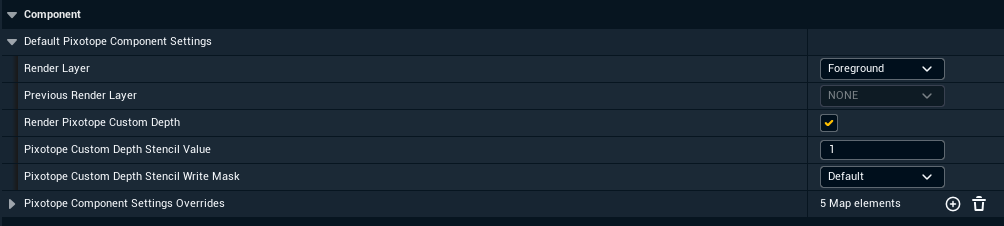
Default Pixotope Component Settings |
The render layer and Pixotope custom depth values applied to any scene component that has no class specific override. |
|
Pixotope Component Settings Overrides |
Per class and per Blueprint component overrides of those defaults, falling back to the nearest parent class that has an entry. |
General
Quality of Life
|
Name |
Description |
|---|---|
|
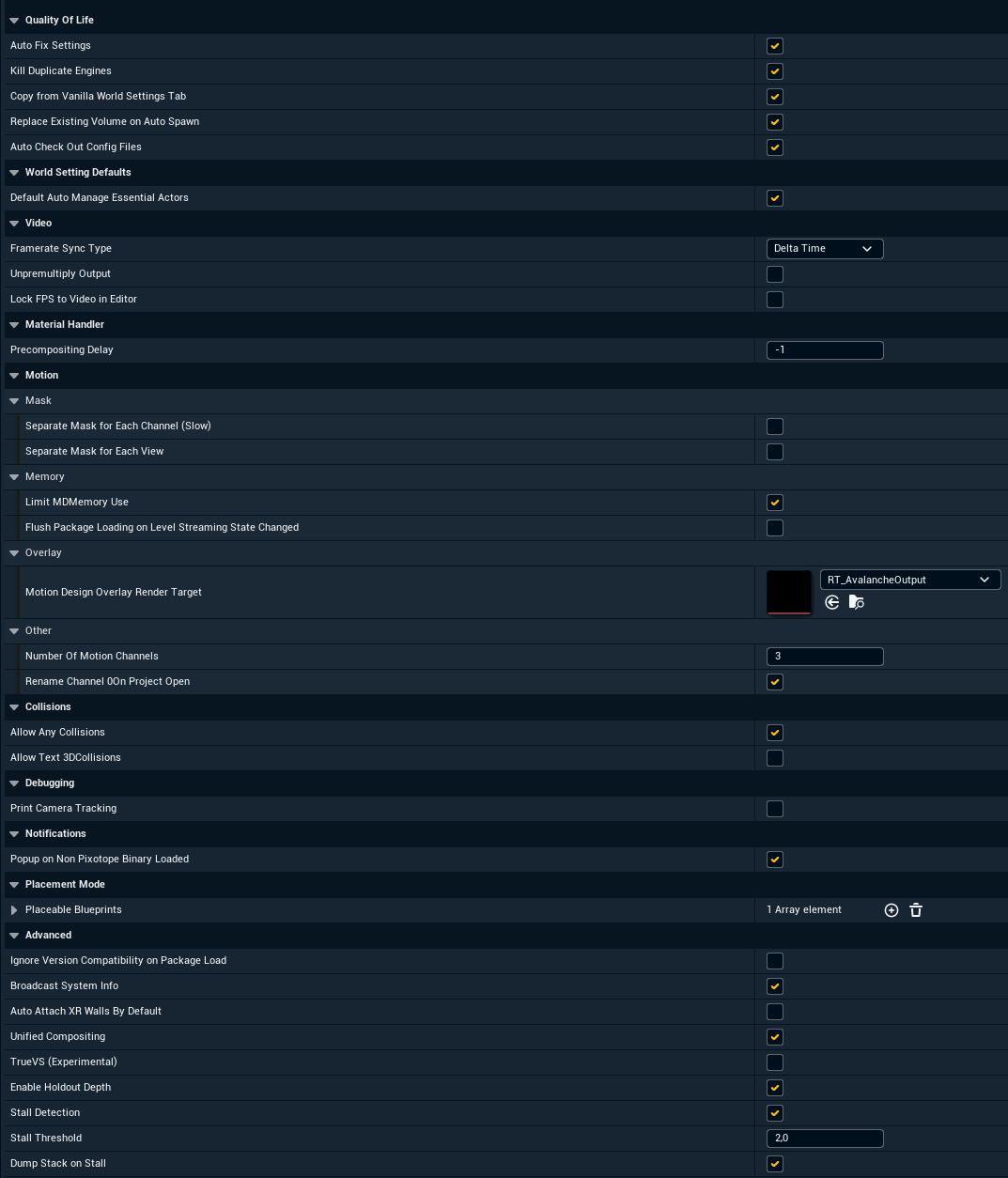
Auto Fix Settings |
Applies recommended settings for a Pixotope project. For a complete list hover over this setting in the Editor. |
|
Kill Duplicate Engines |
Makes the older engine exit when two engine instances are running on the same Pixotope machine. |
|
Copy from Vanilla World Settings Tab |
Mirrors values from Unreal's standard World Settings tab into the Pixotope World Settings tab. |
|
Replace Existing Volume on Auto Spawn |
When Pixotope auto-spawns the post process handler it replaces the first unbound post process volume instead of adding a second one. |
|
Auto Check Out Config Files |
Checks out or unlocks Pixotope config files before writing them, so a setting changed from code is still saved when the file is read only. |
World Setting Defaults
|
Name |
Description |
|---|---|
|
Default Auto Manage Essential Actors |
New levels default to letting Pixotope add and maintain its essential actors automatically. |
Video
|
Name |
Description |
|---|---|
|
Framerate Sync Type |
Selects how the engine framerate follows the video framerate, either through a fixed delta time, through Max FPS, or not at all. |
|
Unpremultiply Output |
Outputs straight (un-premultiplied) alpha instead of premultiplied alpha. |
|
Lock FPS to Video in Editor |
Also applies the framerate sync in Editor and Simulate and not only in Live. |
Material Handler
|
Name |
Description |
|---|---|
|
Precompositing Delay |
Number of frames the compositing input video is delayed by, -1 uses the current frame. |
Motion
|
Name |
Description |
|---|---|
|
Separate Mask for Each Channel (Slow) |
Generates an individual mask per output channel instead of one shared mask. Try this if there are issues with Motion Design masks when using multiple broadcast channels. |
|
Separate Mask for Each View |
Keeps geometry masks active for every view instead of only the active one. Try this if there are issues with Motion Design masks when using multiple broadcast channels. |
|
Limit MD Memory Use |
Caps the queue of Motion Design Niagara data channel publish requests to limit memory use. |
|
Flush Package Loading on Level Streaming State Changed |
Forces pending package loads to complete whenever a Motion Design streaming level changes state. |
|
Motion Design Overlay Render Target |
Render target the Motion Design overlay is rendered into for compositing over the camera. |
|
Number of Motion Channels |
How many Motion Design channels the project provides. |
|
Rename Channel 0 on Project Open |
Renames a Motion Design channel named "Channel_0" to "Channel_1" on project open, if no "Channel_1" exists. |
Collisions
|
Name |
Description |
|---|---|
|
Allow Any Collisions |
When off, no physics state and no collision meshes are created for meshes, so imported levels do not clog performance. |
|
Allow Text3D Collisions |
Lets Text3D actors build collision data, which is off by default because it greatly increases Text3D instantiation cost. |
Debugging
|
Name |
Description |
|---|---|
|
Print Camera Tracking |
Print camera tracking data on the screen. |
Notifications
|
Name |
Description |
|---|---|
|
Popup on Non Pixotope Binary Loaded |
Shows a warning when a plugin or binary that was not built with the Pixotope SDK is loaded. |
Placement Mode
|
Name |
Description |
|---|---|
|
Placeable Blueprints |
Additional blueprints listed in the Pixotope section of the Place Actors panel. |
Advanced
|
Name |
Description |
|---|---|
|
Ignore Version Compatibility on Package Load |
Allows opening projects from newer Pixotope/UE5 patch versions. |
|
Broadcast System Info |
Publishes machine and system information to Data Hub for monitoring. |
|
Auto Attach XR Walls By Default |
New XR walls stay attached to the Real World Reference by default. |
|
Unified Compositing |
Enables the unified compositing pipeline. |
|
TrueVS (Experimental) |
Enables the TrueVS compositing mode for virtual set production. |
|
Enable Holdout Depth |
Makes holdouts write depth so objects behind them are occluded correctly. |
|
Stall Detection |
In Live, reports a stall to Data Hub when the engine stops ticking for longer than the stall threshold. |
|
Stall Threshold |
Time in seconds without a tick before a stall is reported. |
|
Dump Stack on Stall |
Writes a dump folder when a stall is detected. |
Log
Categories
|
Name |
Description |
|---|---|
|
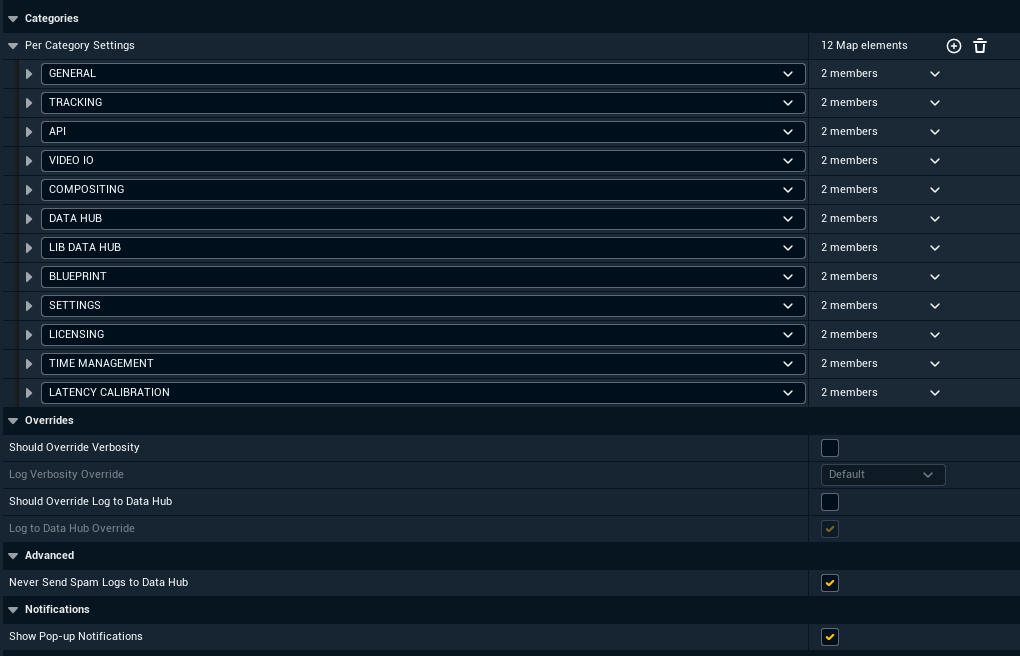
Per Category Settings |
Defines how verbose should be each log category and if it should be comunicated to the network. Setting some categories to Spam can provide useful insights. |
Overrides
|
Name |
Description |
|---|---|
|
Should Override Verbosity |
Enables a verbosity override for all log categories. |
|
Log Verbosity Override |
Defines a verbosity override value for all log categories. |
|
Should Override Log to Data Hub |
Enables a network behavior override for all log categories. |
|
Log to Data Hub Override |
Defines a network behavior override value for all log categories. |
Advanced
|
Name |
Description |
|---|---|
|
Never Send Spam Logs to Data Hub |
This blocks sending too-verbose logs to the network. Turning this off could potentially result in an infinite feedback loop. Beware! |
Notifications
|
Name |
Description |
|---|---|
|
Show Pop-up Notifications |
Shows Pixotope messages as pop-up notifications in the Editor, they are written to the log either way. |
Synchronization
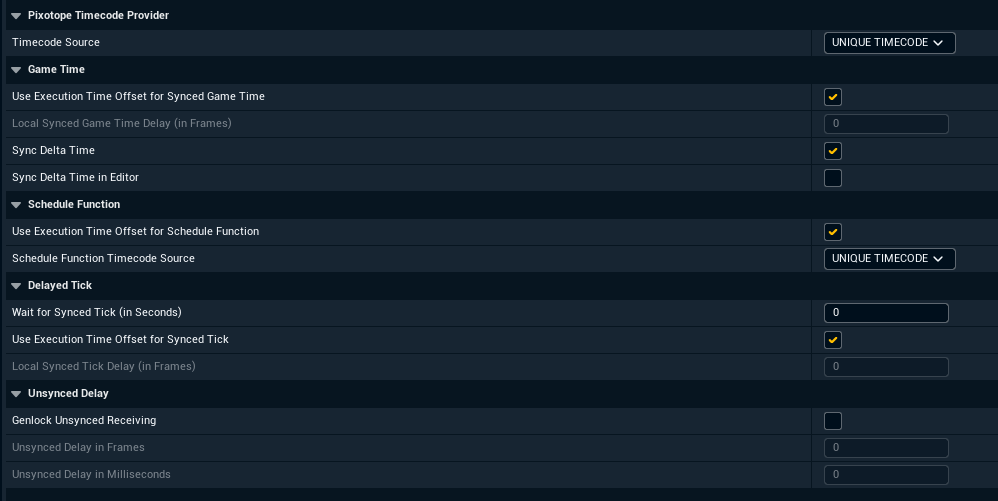
Pixotope Timecode Provider
|
Name |
Description |
|---|---|
|
Timecode Source |
Which timecode the Pixotope Timecode Provider reports, either the unique timecode, one of the video IO inputs, or game time. |
Game Time
|
Name |
Description |
|---|---|
|
Use Execution Time Offset for Synced Game Time |
Delays synced game time by this machine's execution time offset instead of by a fixed local delay. |
|
Local Synced Game Time Delay (in Frames) |
Fixed local delay in frames applied to synced game time when the execution time offset is not used. |
|
Sync Delta Time |
Uses a shared delta time across engines so time-based animation stays identical on all machines. |
|
Sync Delta Time in Editor |
Also applies delta time synchronization in the Editor, which can look jumpy when not meeting the genlock framerate. |
Schedule Function
|
Name |
Description |
|---|---|
|
Use Execution Time Offset for Schedule Function |
Compensates scheduled function calls with this machine's execution time offset. |
|
Schedule Function Timecode Source |
Timecode source used when scheduling function calls. |
Delayed Tick
|
Name |
Description |
|---|---|
|
Wait for Synced Tick (in Seconds) |
Delays the engine start by this many seconds so that all engines start ticking together. |
|
Use Execution Time Offset for Synced Tick |
Delays the tick by this machine's execution time offset instead of by a fixed local delay. |
|
Local Synced Tick Delay (in Frames) |
Fixed local delay in frames before this machine starts ticking, when the execution time offset is not used. |
Unsynced Delay
|
Name |
Description |
|---|---|
|
Genlock Unsynced Receiving |
Aligns incoming Data Hub data that carries no timecode to the genlock signal. |
|
Unsynced Delay in Frames |
Delay in frames applied to unsynchronized incoming data. |
|
Unsynced Delay in Milliseconds |
Additional delay in milliseconds applied to unsynchronized incoming data. |
Templates
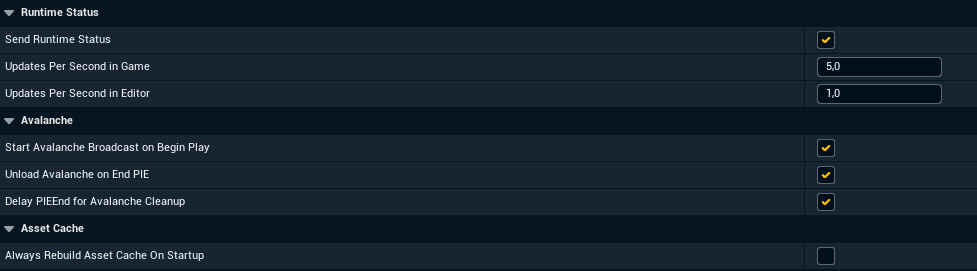
Runtime Status
|
Name |
Description |
|---|---|
|
Send Runtime Status |
Reports template runtime status, such as loaded or playing, to Data Hub. |
|
Updates per Second in Game |
How often runtime status is sent while in Live. |
|
Updates per Second in Editor |
How often runtime status is sent while in the Editor. |
Avalanche
|
Name |
Description |
|---|---|
|
Start Avalanche Broadcast on Begin Play |
Starts the Motion Design broadcast automatically when play begins. |
|
Unload Avalanche on End PIE |
Unloads Motion Design assets when a Play-In-Editor session ends. |
|
Delay PIE End for Avalanche Cleanup |
Holds the end of a Play-In-Editor session briefly so Motion Design can clean up. |
Asset Cache
|
Name |
Description |
|---|---|
|
Always Rebuild Asset Cache On Startup |
Rebuilds the Pixotope asset cache every time the editor opens the project instead of only when it is missing. |
Tracking
These settings are not expected to be changed by users, they exist for development and emergency use.
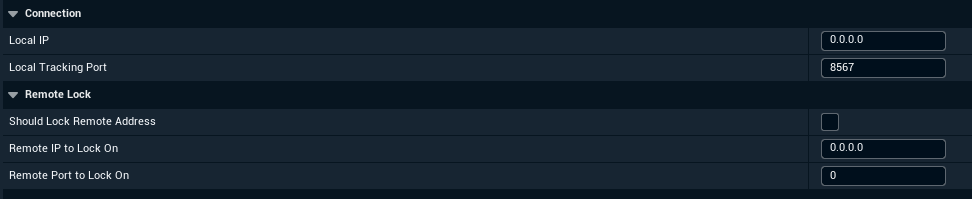
Connection
|
Name |
Description |
|---|---|
|
Local IP |
Which local IP CTSReceiver binds to for incoming tracking data. |
|
Local Tracking Port |
Which local port CTSReceiver binds to for incoming tracking data. |
Remote Lock
|
Name |
Description |
|---|---|
|
Should Lock Remote Address |
When checked CTSReceiver ignores incoming data that does not come from the remote IP and/or port. |
|
Remote IP to Lock On |
Accepted remote IP for tracking data, 0.0.0.0 means accept all. |
|
Remote Port to Lock On |
Accepted remote port for tracking data, 0 means accept all. |
Viewport
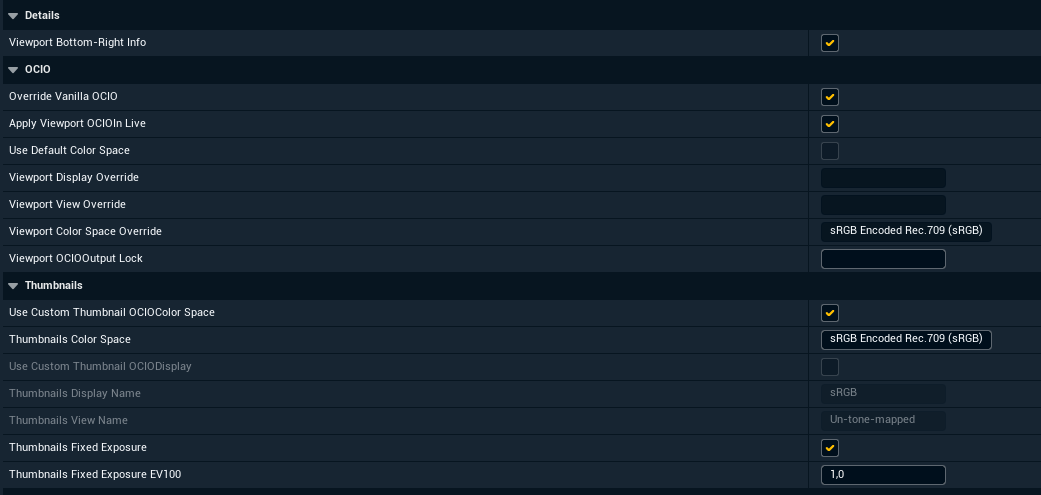
Details
|
Name |
Description |
|---|---|
|
Viewport Bottom-Right Info |
Enables a text label in the viewport, informing about applied color mode. |
OCIO
|
Name |
Description |
|---|---|
|
Override Vanilla OCIO |
Enables Pixotope OCIO preview in the viewport. |
|
Apply Viewport OCIO In Live |
Enables Pixotope OCIO preview in Live and Live Preview modes. |
|
Use Default Color Space |
Read only, shows whether the viewport preview uses the project default color space rather than the overrides below. |
|
Viewport Display Override |
Read only, shows the OCIO display device used for the viewport preview. |
|
Viewport View Override |
Read only, shows the OCIO view transform used for the viewport preview. |
|
Viewport Color Space Override |
Read only, shows the color space used for OCIO preview. |
|
Viewport OCIO Output Lock |
An optional IO channel link for OCIO preview. |
Thumbnails
|
Name |
Description |
|---|---|
|
Use Custom Thumbnail OCIO Color Space |
Renders asset thumbnails using the color space set below instead of an OCIO display and view pair. |
|
Thumbnails Color Space |
Color space used for asset thumbnails. |
|
Use Custom Thumbnail OCIO Display |
Renders asset thumbnails using the OCIO display and view pair set below instead of a color space. |
|
Thumbnails Display Name |
OCIO display device used for asset thumbnails. |
|
Thumbnails View Name |
OCIO view transform used for asset thumbnails. |
|
Thumbnails Fixed Exposure |
Renders asset thumbnails at a fixed exposure instead of using auto exposure. |
|
Thumbnails Fixed Exposure EV100 |
Exposure value in EV100 used when fixed thumbnail exposure is enabled. |
Learn more about Color managed preview in Editor