
When you change the source of a slot or switch to a different layout, the wall does not change right on the frame you trigger it.
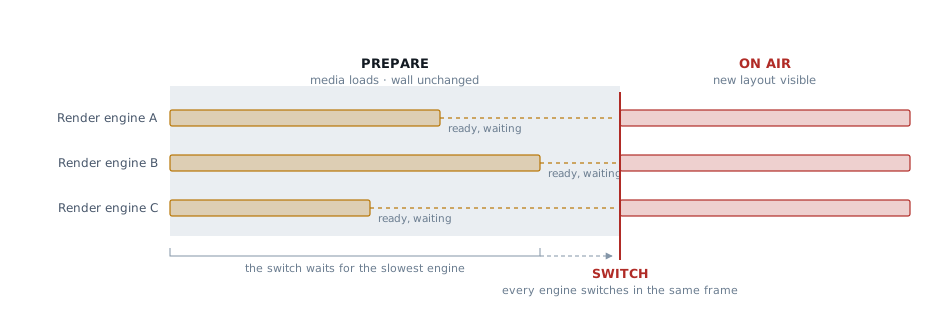
As video files need time to open and buffer before they play cleanly, and an LED volume is driven by several render engines that all have to switch on the same frame, the action is split into 2 steps:
-
Prepare, every render engine targeted by the layout loads the new media for its slots. The wall keeps showing the current content, unchanged
-
Switch, once all render engines report ready, they switch on the same frame and the transition plays
What preparation time depends on
Preparation is set by the slowest render engine and the heaviest clip.
-
A layout of still images or media inputs is ready almost instantly
-
A layout with several large video files takes noticeably longer
-
A single render engine with slow storage or a cold cache holds up the whole wall. The switch waits for all of them
Triggering another change before the first finishes
You can trigger another change at any point, and you always end up on the last one you triggered. What differs is what happens to the one you abandoned.
|
You trigger a change while |
What happens |
|---|---|
|
a previous change is still preparing |
The change that is already preparing finishes first, then yours starts preparing. |
|
a transition is running on air |
The running fade or wipe jumps to its end, then your change takes over. |
If a change is taking longer or does not happen at all check the media’s file location, codec or size.