The AR Shadow, Reflection & Light Catcher allows you to easily illuminate video with scene lights.
How to enable
-
Check Pixotope World Settings > AR > Enable Light Catcher
Parameters
-
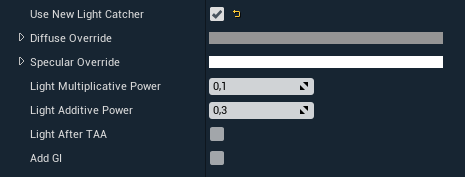
Diffuse OverrideandSpecularOverridedetermine light strength and proportion of diffuse to specular component. -
Light Multiplicative PowerandLight Additive Powercontrol blending light with the video.SceneColor = SceneColor + Video * Light * Multiplicative + Light * Additivetheory is that Multiplicative can brighten the video and additive adds color. -
Light After TAAif checked light compositing happens after TAA, it is more expensive but looks better when using DLSS orScreenPercentage< 100 -
Add GIadds Global Illumination to Catcher
Excluding lights
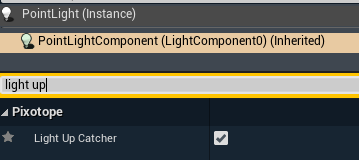
Specify which lights should not contribute to lighting up the catcher. By default, all lights are used.
-
Select the light
-
Uncheck Light Up Catcher