
Pixotope Director is designed with a virtual production workflow in mind. It is built around the main steps, which are shown in the interface in 3 views. These can be switched in the left side menu.
Navigate between views
-
Go to Start
-
Hover over the show name on the top (text turns to "Back to Start"), then click on it
-
OR type
Ctrl+1
-
-
Go to Setup/Production panels
-
Hover over the show name on the top (text turns to "Continue into Show"), then click on it
-
Select the Setup/Production tag > panels are filtered
-
-
OR
Ctrl+2/Ctrl+3
-
-
Show Setup/Production panels together
-
Unselect the Setup/Production tag > all panels are shown
-
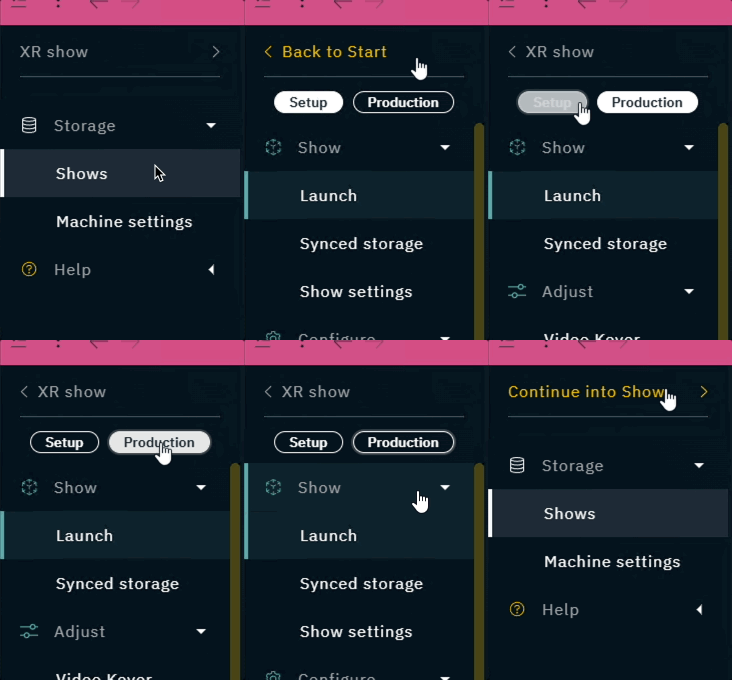
START view
-
Create, open and manage shows
-
Change machine role and other machine specific settings
Learn more about Starting Director
SETUP view
-
Change project link and other show settings
-
Do an initial push/pull of your project to sync all the machines
-
Configure and calibrate your camera tracking systems, video inputs and outputs, and color matching
-
Launch levels and create custom control panels
Learn more about Setting up a show
PRODUCTION view
-
Push changes to your project and auto-pull them on the other machines
-
Launch levels and control panels
-
Adjust the video keyer, composite, effects, color grading, XR and/or every single object in your level
-
Control your running levels using custom control panels
Learn more about Making adjustments
The Help and Diagnostics sections are available in all views.

Learn more about What is stored where?