For formats see Supported video formats and frame rates
SDI
AJA
See System Requirements for supported AJA video cards
Input/Output options
|
Input |
Device Only shown if more than one AJA card is present. |
Device name and number 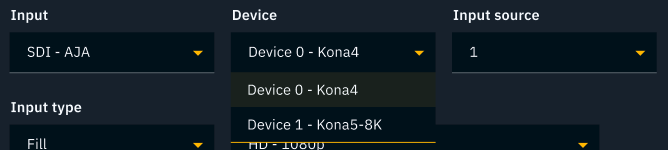
|
|---|---|---|
|
Input source |
Spigot number |
|
|
Channel |
Use a media input for Key. The camera system needs to be Fill. |
|
|
Metadata |
Extract tracking from audio > Audio channel |
|
|
Color > Range |
Learn more about SDI Color range settings below |
|
|
Output |
Device Only shown if more than one AJA card is present. |
Device name and number 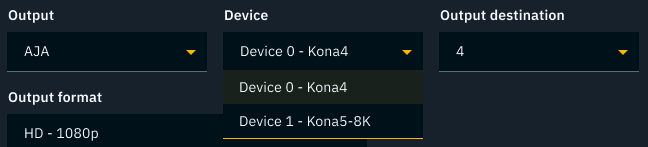
|
|
Output destination |
Spigot number |
|
|
Output type |
Learn more about Compositing modes |
|
|
Audio |
Pass-through audio and Engine audio Learn more about how to Configure audio output and pass-through |
|
|
Color > Range |
Learn more about SDI Color range settings below |
BMD
See System Requirements for supported BlackMagic Design DeckLink video cards
Blackmagic Desktop Video Setup
-
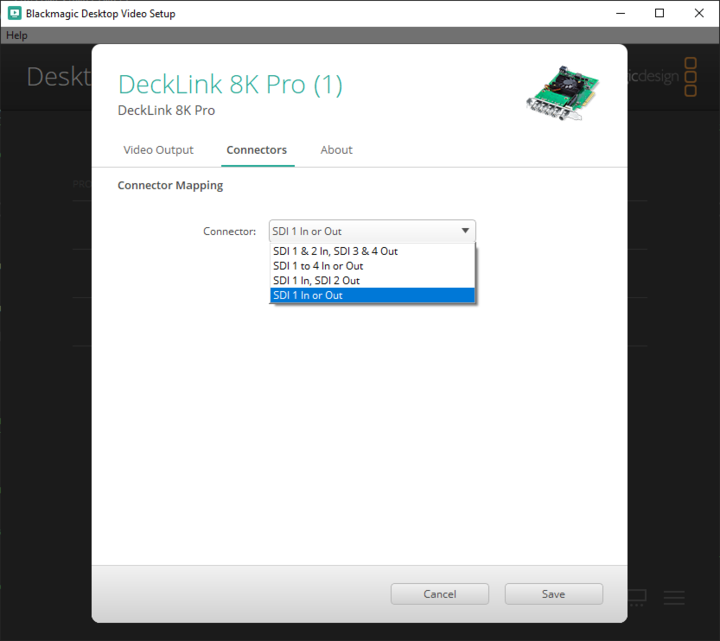
Set the Connector Mapping to
SDI 1 In or Outin the Blackmagic Desktop Video Setup application
Blackmagic Desktop Video Setup application - Connector Mapping options
|
SDI 1 & 2 In, SDI 3 & 4 Out |
This option requires two cables for a single input. Not something that you would often use. |
|---|---|
|
SDI 1 to 4 In or Out |
This option is for 8k or UHD2, it requires all four cables to be used for a single input or output. Not something that you would often use. |
|
SDI 1 In, SDI 2 Out |
This option is a full duplex mode, if you use this you must use the same spigots within Director (e.g. Camera SDI 1, and Output SDI 1). This can help if you have no reference -- but not having a Genlock reference is STRONGLY not advised. |
|
SDI 1 In or Out |
This option treats all spigots as either a single input or single output (e.g. Camera SDI 1, and Output SDI 2). This is the suggested mode for Pixotope. |
Input/Output options
|
Input |
Input source |
Spigot number |
|---|---|---|
|
Channel |
Use a media input for Key. The camera system needs to be Fill. |
|
|
Metadata |
Extract tracking from audio > Audio channel |
|
|
Color > Range |
Learn more about SDI Color range settings below |
|
|
Output |
Output destination |
Spigot number |
|
Output type |
Learn more about Compositing modes |
|
|
Audio |
Enable Learn more about how to Configure audio output |
|
|
Color > Range |
Learn more about SDI Color range settings below |
Matrox
See System Requirements for supported Matrox video cards
Matrox card configuration
Matrox card configuration (example for DSX LE5 LP /4)
-
Close Pixotope and any Matrox tool
-
Card to be configured should NOT be in use
-
-
Open Power shell (or cmd) with Administrator privileges
-
Go to
C:\Program Files\Matrox DSX-TopologyUtils\drivers\Xmio5Le5ConnectorMapping\Dsxle5lp
Get configuration file name
-
Execute
dirto get a list of available.pinconfiguration files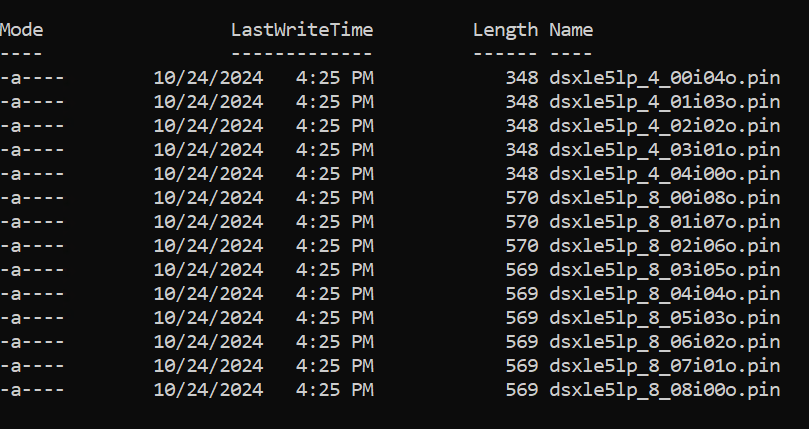
-
Choose the file based on the needed inputs and outputs
-
The format is:
[card name]_[total]_[inputs]i[outputs]o-
4_ or 8_ = total channels
-
XXi = number of inputs
-
YYo = number of outputs
Example:
4_02i02o= 4 total channels (2 inputs, 2 outputs) -
-
-
Note down the Configuration file name (including the extension
.pin)
Get serial number
-
Execute
..\..\mvConnectorConfig.exe list -
Note down the Serial number (
S/N)
Example:
PS C:\Program Files\Matrox DSX-TopologyUtils\drivers\Xmio5Le5ConnectorMapping\Dsxle5lp> ..\..\mvConnectorConfig.exe list

<< Matrox Connectors Configuration tool >> Mon Sep 15 10:52:37 2025
Available hardware:

   0) DSXLE5 S/N=A680572
Configure card
-
Execute
..\..\mvConnectorConfig.exe load -f="[Configuration file name]" -sn=[Serial number]
Example:
PS C:\Program Files\Matrox DSX-TopologyUtils\drivers\Xmio5Le5ConnectorMapping\Dsxle5lp> ..\..\mvConnectorConfig.exe  load -f="dsxle5lp_4_04i00o.pin"  -sn=A680572

<< Matrox Connectors Configuration tool >> Mon Sep 15 10:54:58 2025

Updating card 0-DLE5L/4/100-S/N A680572
Successfully updated card 0-DLE5L/4/100-S/N A680572
Verify the configuration
-
Execute
..\..\mvConnectorConfig.exe -ShowCurrent -sn=[Serial number]
Example
PS C:\Program Files\Matrox DSX-TopologyUtils\drivers\Xmio5Le5ConnectorMapping\Dsxle5lp> ..\..\mvConnectorConfig.exe  -ShowCurrent -sn=A680572

<< Matrox Connectors Configuration tool >> Mon Sep 15 10:56:34 2025
Current IO Configuration:
   SDI Inputs  = 4
   SDI Outputs = 0
Input/Output options
|
Input |
Input source |
Spigot number |
|---|---|---|
|
Channel |
Use a media input for Key. The camera system needs to be Fill. |
|
|
Metadata |
Extract tracking from audio > Audio channel |
|
|
Color > Range |
Learn more about SDI Color range settings below |
|
|
Output |
Output destination |
Spigot number |
|
Output type |
Learn more about Compositing modes |
|
|
Color > Range |
Learn more about SDI Color range settings below |
Genlock and input format requirements
-
If a spigot is used as the Lock source, all inputs must match the resolution of that spigot. For example, a 720p genlock spigot cannot be combined with 1080 inputs.
-
Black burst (PAL/NTSC): cannot be used as an external reference as we only support 720p and higher
-
Tri-level reference: a 720p reference cannot be used with 1080 or higher inputs
-
-
Inputs must be in the same frame rate family as the reference signal:
-
PAL-based: 25, 50
-
NTSC-based: 23.98, 29.97, 59.94
-
Display-based: 24, 30, 60
-
Learn more about how to Configure lock/genlock
SDI color range settings
The range setting defines which code values of the 10-bit signal are used. Sender and receiver must be set to the same range, the range cannot be detected from the signal itself.
Learn more about Video signal and encoding
Input
Set to match what the connected device sends.
|
Legal (64-940) |
Standard broadcast range (default) |
|---|---|
|
Full (0-1023) |
Whole code value range is used |
Output
All four options are available on AJA, BMD and Matrox
|
Legal (64-940) |
Standard broadcast range, footroom and headroom are clamped (default) |
|---|---|
|
Full (0-1023) |
Whole code value range is used |
|
Super Blacks (0-940) |
Footroom below 64 is kept
|
|
Super Brights (64-1023) |
Headroom above 940 is kept for HDR workflows
|
File
Not recommended for on-air use!
Playback
-
File playback targets the same frame rate as the Lock source, but consistent speed cannot be guaranteed. This depends on the read rate of your hard drive
Recording
-
Starting the recording leads the videoIO service to rebuild causing
-
all file inputs to restart
-
and all other inputs to show a short glitch
-
-
Recording 1 or more outputs has performance costs
|
Input (playback) |
Input source |
Video: Images: |
|---|---|---|
|
Channel |
Use a media input for Key. The camera system needs to be Fill. |
|
|
Output (recording) |
Output destination |
Name of your output stream Format: Embed tracking (optional): Audio channel |
|
Output type |
Learn more about Compositing modes |
|
|
Pixel format |
|
|
|
Bitrate (Mbit/s) |
Output bitrate: 25 (default) |
Learn more about how to Record and playback files with tracking
GPU
This allows you to output to an HDMI output of your graphics card directly. The output is stretched to the whole monitor’s resolution and put in the "background". It can be used seamlessly in a dual monitor setup.
GPU output does not support Genlock
|
Output |
Output destination |
Graphics card output |
|---|---|---|
|
Output type |
Learn more about Compositing modes |
|
|
Output format |
In addition to the generally Supported video formats
|
HTML
This input renders a specified website.
|
Input |
Background source |
List of media inputs |
|---|---|---|
|
Input source |
URL of the website to display |
|
|
Channel |
Learn more about Compositing modes |
Image sequence
Not recommended for on-air use!
File playback targets the same frame rate as the Lock source, but consistent playback cannot be guaranteed (depends on the read rate of your hard drive).
|
Input |
Input source |
Folder with |
|---|---|---|
|
Channel |
Learn more about Compositing modes |
NDI
Video streaming protocol - What is NDI?
|
Input |
Input source |
Any NDI stream on this network |
|---|---|---|
|
Channel |
Use a media input for Key. The camera system needs to be Fill. |
|
|
Output |
Output destination |
Name of your output stream |
|
Output type |
Learn more about Compositing modes |
|
|
Output quality |
|
OGraf
This is an "internal" HTML input needed for OGraf rendering.
Learn more about Using Live controller with OGraf
|
Input |
Background source |
List of media inputs |
|---|---|---|
|
Channel |
Learn more about Compositing modes |
SRT
SRT is an established open source video streaming protocol
|
Input and Output |
Mode |
|
|---|---|---|
|
Send to |
Applicable for Caller mode
|
|
|
Port |
Port number - default: |
|
|
Codec |
|
|
|
Latency buffer |
Latency in ms - default: |
|
|
Password |
If a password is set, the stream is encrypted - default: no password set |
The frame rate of the incoming stream (caller) and the input (listener) must be the same!
If the Editor drops its frame rate well below the one chosen, it will lead to an SRT input buffer overflow. This then causes a rebuild of the videoIO pipeline which will, during rebuild, display “Misconfigured Input Signal”.
The frame rate of the output (caller) and the listener of the stream must be the same!
If the receiver of the output is not able to consume the incoming packets fast enough its SRT receiver buffer will overflow and most likely break the connection.
Ways to send an SRT stream
Ways to read an SRT stream
ST2110
The industry-standard protocol for high-quality, uncompressed video over IP.
|
Input |
Input source |
for Uncompressed Video (ST2110-20) and Ancillary (ST2110-40) carrying timecode |
|---|---|---|
|
Channel |
Use a media input for Key. The camera system needs to be Fill. |
|
|
Output |
Output destination |
for Uncompressed Video (ST2110-20) and Ancillary (ST2110-40) carrying timecode |
|
Output type |
Learn more about Compositing modes |
Stream (WebRTC)
|
Output |
Stream endpoint (per machine) |
List of available network interfaces |
|---|---|---|
|
Port |
Port number |
|
|
Stream quality |
|
|
|
Output type |
Learn more about Compositing modes |
Learn more about how to Configure stream output (using WebRTC)
Webcam
|
Input |
Input source |
Any webcam which is registered in the system |
|---|---|---|
|
Channel |
Fill |