
Frame accurate syncing is essential in multi-machine setups.
Configure
-
Set up a primary timecode source
Learn more about how to Configure timecode (LTC) -
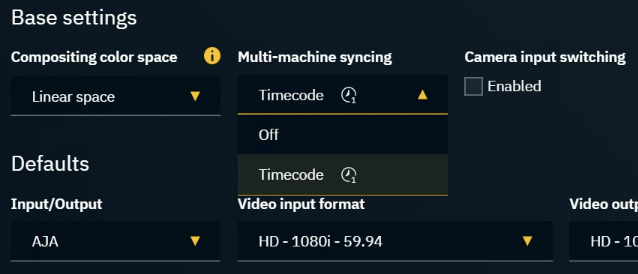
Set Multi-machine syncing to "Timecode" in SETUP > Show > Show settings > Base settings
-
Launch levels on all machines
-
Check if
-
timecode is available on all machines, by clicking on “Get all timecodes” in
-
SETUP > Calibration > Syncing
-
OR in the Status panel
-
-
A level needs to be running as the timecode is reported by the engine.
In case Multi-machine syncing is enabled and NO timecode is available:
-
All messages will still be processed, but they will not be in sync
Calibrate
-
Go to SETUP > Calibration > Syncing
-
Check if the input and output delays of all machines are the same
-
hardware differences might require slightly different delays
-
Sync an XR wall with a virtual set extension
When working with virtual set extensions, the time between filming the LED screen and displaying the rendered content should ideally be 0. As this is physically not possible we have to
-
reduce latency for XR machines
-
mitigate the remaining time difference between XR and set extension using an Set extension delay
Reduce latency
-
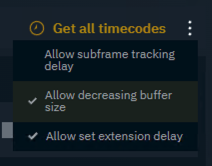
Enable Allow decreasing buffer size in the overflow menu on the right
-
Decrease the delay for
-
XR machines on
-
tracking input
-
video output
-
-
AR machine on
-
tracking input
-
-
Mitigate remaining time difference
-
Make sure Allow set extension delay is enabled
-
Add Set extension delay
-
Optionally
-
switch the reprojection method and disable Tracking extrapolation
-
adjust the Execution time on the AR machine
-
|
Set extension delay |
Add a delay to compensate for the time difference between XR and set extension rendering. |
|---|---|
|
Video reprojection |
|
|
Scene reprojection |
|
|
Tracking extrapolation |
Extrapolates tracking to reduce the potential artifacts introduced by the latency compensation, but will not solve the issue on its own. |
Set up timecode synchronized levels
Learn more about how to Set up timecode synchronized levels