
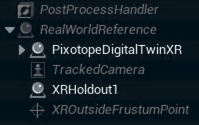
Pixotope Graphics requires some actors to always be present in a level. These actors are called Pixotope Essential Actors.
|
Post Process Handler |
Learn more about the PostProcessHandler vs PostProcessVolume |
|
|
Real World Reference |
The Real World Reference actor (formally Camera Root) is the parent for all elements that represent your physical setup. Learn more about the Real World Reference |
|
|
|
Tracked Camera |
Tracked Camera is the virtual representation of the real camera which is feeding tracking and video into the engine. |
|
XR Outside Frustum Point |
When rendering XR, this actor represents a reference point, when a static outside camera view is needed. Learn more about how to Adjust XR |
|
In the Outliner, they are displayed in gray and italic.
Behaviour when doing level streaming
Essential Actors within streamed levels are automatically hidden/disabled making the one in the persistent level the only ones available.
A streamed level should provide the Essential actors
To override the default behaviour
-
Go to Pixotope World Settings of the streamed level which should provide the Essential actors
-
Check Has Priority Over Persistent
If there are multiple streamed levels with Has Priority Over Persistent enabled, the first one found will take precedence.
A streamed level should use its own Post Process Handler
-
Go to Pixotope World Settings of the streamed level
-
Uncheck Disable Post Process Handler If Not Priority
However it will not be targeted by Director unless Has Priority Over Persistent is enabled.