IO.Bot is a multi-platform software developed by XD motion allowing to manage robotic cameras and PTZs.
Learn more about → https://www.xd-motion.com/
Set up IO.Bot connection
-
Configure the IO.Bot server IP address in Director > Setup > Machine and wait for the “Connection successful” notification
IO.Bot must run its REST API server in the same network as Pixotope. Please contact XD motion for details.
Create presets and trajectories
For information on how to create presets for robotic cameras or PTZs, please refer to XD motion’s documentation.
Supported preset types
|
Type |
Supported calls |
|---|---|
|
Position |
|
|
Trajectory |
|
Trigger presets from Control panel
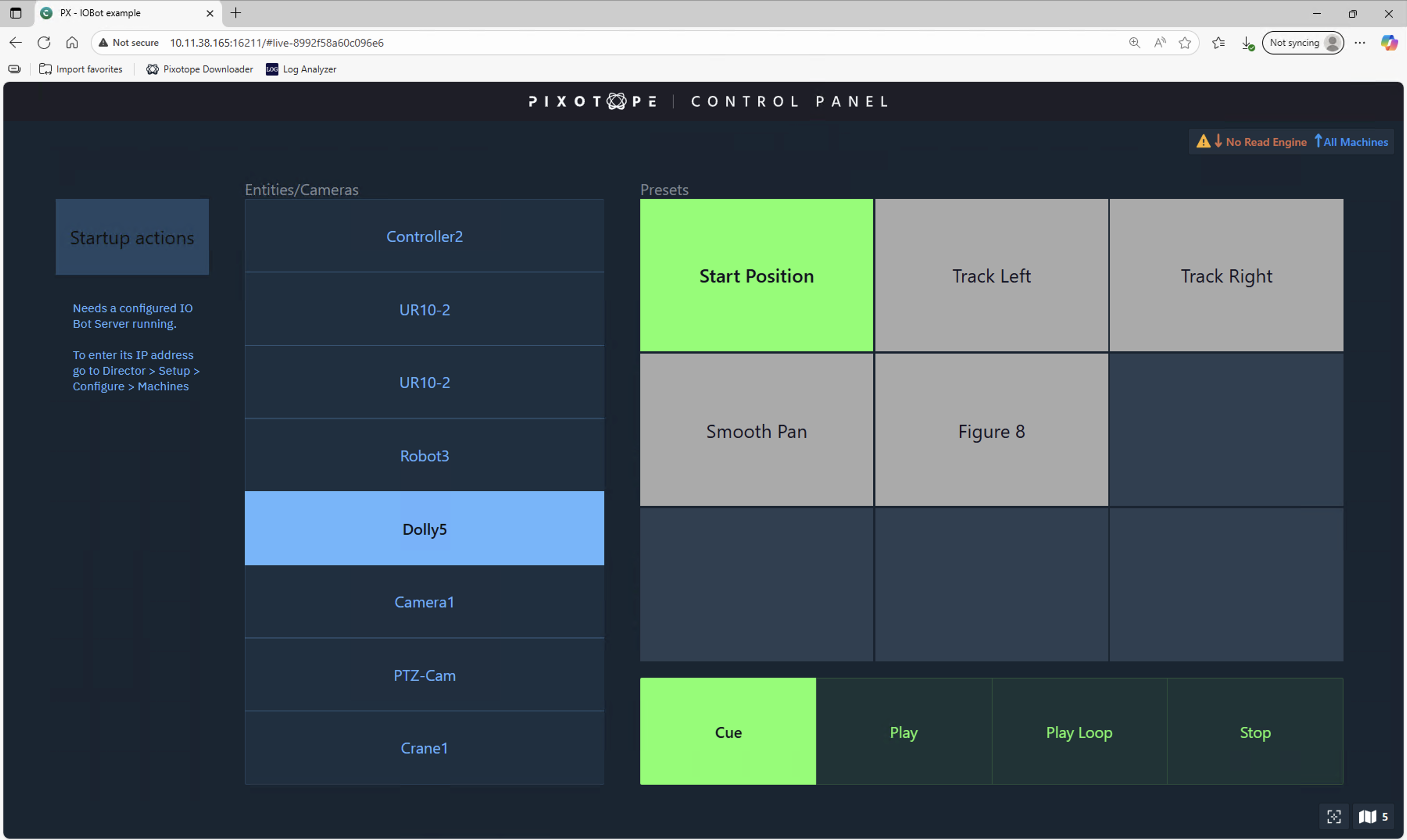
The current setup involves API call triggers. An example setup can be checked out in the attached control panel.
Launch IOBot test panel
-
Go to the Launch panel in Director
-
Click the "Open control panel" button
-
Select the PX - IOBot example and click "Launch LIVE"
IOBot example panel documentation
-
In Director > Configure > Machines enter IP and Port of the IO.Bot server
-
Click "Test connection"
-
-
Select a camera from the Entities/Cameras list
-
Select a preset from the Presets list
-
Click Cue, Play, Loop, Stop