
Pixotope Motion is available for Motion, AR/VS and XR licenses.
With Pixotope Motion and Erizos Studio you can take your motion graphics workflow to the next level.
-
Create your templates using Pixotope Editor and the power of Unreal Engine Motion Design
-
Render them with Pixotope Engine
-
Control them with Erizos Studio
Recommended Motion setup
We recommend having at least two machines
-
Control and Preview engine
-
Preview: Pixotope Motion
-
Control: Erizos Studio
-
-
Playout engine
-
Pixotope Motion
-
For creation of templates only Pixotope Motion is needed.
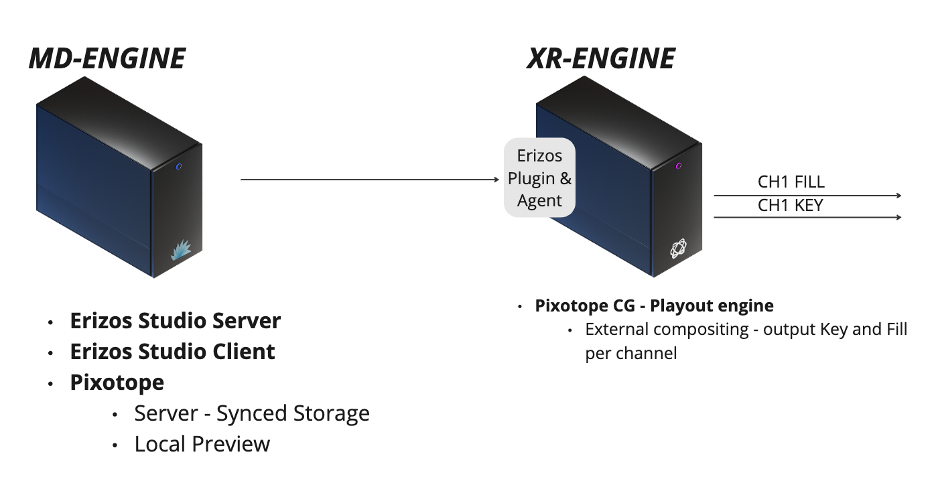
Setting up the control and preview engine
-
Install Pixotope Graphics
-
Install the Erizos Plugin which you can download from Pixotope Cloud > Downloads > [Installed Version] > Tools
Learn more about how to Install Erizos Plugin
-
Install Erizos Studio Server and Agent downloadable via the Erizos portal
-
For the Erizos Studio installer select the Server option
-
Learn more about where to download and how to install Erizos → https://docs.erizos.tv/userguide/StudioInstallation/
-
Install Erizos Media Hub if this Erizos component is part of your workflow
-
Open Pixotope Graphics and select the Server role
Learn more about Network roles - Stand-alone, Client or Server
-
Create a new show
-
Select "Motion template"
-
Enable "Initial push" and "Enable auto-pull"
-
-
A project with the Motion level structure is created
Learn more about the Motion level structure
Already have a project?
-
When creating a show, select "From Existing Project"
-
Select "Move/Copy into Synced Storage”
-
Enable "Initial push" and "Enable auto-pull"
-
If not already done, prepare your project for Motion
Setting up the playout engine
-
Install Pixotope
-
Install the Erizos Plugin which you can download from Pixotope Cloud > Downloads > [Installed Version] > Tools
-
Install the Erizos Agent downloadable via the Erizos portal
-
Open Pixotope Director
-
Select the Client role and connect to the above machine (Server)
-
The project will be pulled automatically
-
Learn more about how to Sync projects and other files in Synced storage
Next steps
-
Set up Director for Motion -
Prepare project for Motion -
Choose a rendering option -
Create a template -
Create complex transition logic with inter-template dependencies using the Transition Logic tree -
Create complex transition logic using Scene States (State Machines) -
Import templates into Erizos Studio -
Control multiple templates from one page (combo pages)